iTech
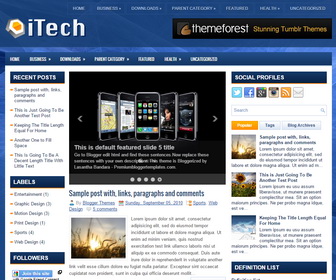
The template details
Features & setup
iTech is a Responsive, 3 Columns Blogger Template for Technology Blogs. iTech Blogger Template has a jQuery Image Slider, 2 Dropdown Menus, 468x60 Header Banner, Related Posts, Breadcrumb, 4 Columns Footer, Left and Right Sidebar, Social Buttons, Tabbed Widget and More Features.
Template type : 2 Sidebar, 3 Column, 4 Column footer, Adapted from WordPress, Blue, Breadcrumb, Elegant, Featured Section, Fixed width, Responsive, Fresh, Header Banner, Left Sidebar, Magazine, Mobile Friendly, Orange, Premium, Related Posts, Right Sidebar, Slider, Tabbed widget, Top Navigation Bar, Web 2.0, White
How to Configure iTech Blogger Template
Read instructions given below to configure iTech Blogger Template.
You need to use 460px width and 300px height size images for the slider.
There are 2 versions: with slider and without slider
Main column area width is 460px.
How To Configure Featured Content Slider
Ready to install?
Back up your current Blogger template first, then follow this template’s own setup notes.
Installation guide → Ask a question →Find your next design
A template that fits your blog.
Choose your style, layout and features to explore the collection.
Keep exploring
This is nice template. Thanks for sharing this here....
I want to remove these three widgets (1. BLOGGER TUTORIALS, 2. PREMIUM TEMPLATES and 3. LABELS) from this template but I am not able to do this. Please help me to remove these from this this templates. I am waiting for your reply.. ........................
Thanks!!
What a nice Template . How to I edit menu bar. Please help me.........................
I wanna ask you a question, how to edit the social profiles? It is very important to me
you want to go Template -> Edit HTML to change social links.
I want this theme in black color can you help me.
Thanks for such a nice template. I applied it but slider is not working for me. Will you please check it for me? I'm not pasting here the xml code because it will look odd here in comments. If you want, i can send it to you. Please check it..
thank's gan .,.,.
Hi! I'm spanish. I want change "Read more" (botom) to "Leer mas"... As I can do?
go to "Edit HTML" and find the word "Read More" and replace it with "Leer mas".
Slider not working, please check it out http://blueblockng.blogspot.com/
try moving your widget one by one. it will work.
ok tanx, it worked
Dear sir, i wana same theme for WordPress, So please help me.
Thanks in Advcance
http://newwpthemes.com/itech-free-wordpress-theme/
The template I Tech is superb, very nice. But I can not find how to change the images of the Slider.
I would appreciate guidance.
need to go "Edit HTML" for that.
Thanks ... Successfully resolved.
Hello sir, the theme is very nice but I don't know how to edit menu?? From where to do that please help me.
please check our tutorials.
Please tell me How To Add a Header Logo
please... thanks
you can upload logo in "Layout" page.
Please tell me How To make a Header just one and its full image
thanks
you need some knowledge about HTML and CSS to do this yourself. contact me if you need a personal support.
I love this template but the problem is that after editing , the slider is not moving. Pls, how do i make the slider move
For theme customization, request a paid support using contact form. thanks.