When you upload a template to your blog, you have to configure page navigation properly.
For example, if you want to show 8 posts on home page first go to "Settings" --> "Formatting". (if you are using Blogger new interface go to "Settings" --> "Posts and comments")
Change "Show at most" property as 8. save the settings.
Now go to "Design" --> "Edit HTML". (if you are using Blogger new interface go to "Template" --> "Edit HTML"). click on "Expand Widget Templates". find this:
var postperpage=4;
Look at the image below:
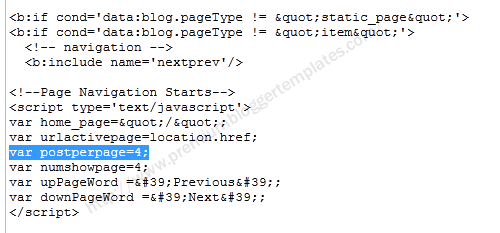
Now change the above line as,
var postperpage=8;
Save the template. now navigation will work correctly.
My page navigation still not working using nextra template. pls..
I have done this, but when I get to about page 5 of my navigation, it only shows 8 posts per page for a while – how can I fix this? My Blogger settings are set to 10 per page, and I changed the code to 10 per page, so why does it change after a few pages? Please email me with any resolve. Thank you!
I have changed my blog post as:
var postperpage=10;
But it not work :'(
Please help me…
I am using the following template for my blog- http://istash.blogspot.com
https://www.premiumbloggertemplates.com/2011/08/viera-premium-blogger-template.html
Already page navigation script is included in the template. I have set to show 10 posts per page and I have configured the HTML. But, no older posts are showing in the 2nd page. Please give a proper solution for this.