Veecard
Free
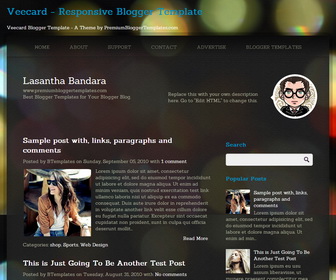
Design preview · Blogger
Enlarge screenshot ↗
(opens preview)
The template details
Features & setup
Template type : 1 Sidebar, 2 Column, Adapted from WordPress, Black, Elegant, Fixed width, Responsive, Fresh, Magazine, Premium, Right Sidebar, Top Navigation Bar, Web 2.0
How To Add Links Top Navigation Menu
Go to "Layout". Click on "Edit" link of "Edit This Menu" widget.
Now add your links to that link list widget.
Configure Social Buttons:
Find this in "Edit HTML":
<!-- begin #socialIcons -->
<div class='clearfix' id='social-icons'>
<ul class='clearfix' id='social-links'>
<li class='facebook-link'><a class='facebook' href='#' id='social-01' rel='nofollow' target='_blank' title='Join Us on Facebook!'>Facebook</a></li>
<li class='twitter-link'><a class='twitter' href='#' id='social-02' rel='nofollow' target='_blank' title='Follow Us on Twitter'>Twitter</a></li>
<li class='google-link'><a class='google' href='#' id='social-03' rel='nofollow' target='_blank' title='Google+'>Google</a></li>
<li class='dribbble-link'><a class='dribbble' href='#' id='social-04' rel='nofollow' target='_blank' title='Dribbble'>Dribbble</a></li>
<li class='vimeo-link'><a class='vimeo' href='#' id='social-05' rel='nofollow' target='_blank' title='Vimeo'>Vimeo</a></li>
<li class='skype-link'><a class='skype' href='#' id='social-06' rel='nofollow' target='_blank' title='Skype'>Skype</a></li>
<li class='linkedin-link'><a class='linkedin' href='#' id='social-07' rel='nofollow' target='_blank' title='Linkedin'>Linkedin</a></li>
<li class='pinterest-link'><a class='pinterest' href='#' id='social-08' rel='nofollow' target='_blank' title='Pinterest'>Pinterest</a></li>
<li class='rss-link'><a class='rss' expr:href='data:blog.homepageUrl + "feeds/posts/default"' id='social-09' rel='nofollow' target='_blank' title='RSS'>RSS Feeds</a></li>
</ul>
</div>
<!-- end #socialIcons -->
Replace "#" marks with your social links.
Ready to install?
Back up your current Blogger template first, then follow this template’s own setup notes.
Installation guide → Ask a question →Find your next design
A template that fits your blog.
Choose your style, layout and features to explore the collection.
Keep exploring