Typominima
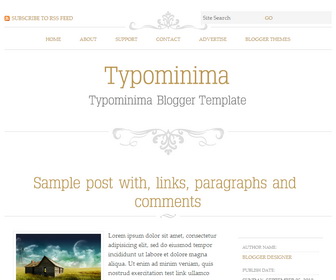
The template details
Features & setup
Typominima is a 2 Columns Minimalist Blogger Template for Writers/publishers. Typominima Blogger Template has Minimalist Design, Cufon Fonts, Top Navigation Menu, 3 Columns Footer and Read More Feature.
Template type : 1 Sidebar, 2 Column, 3 Column footer, Adapted from WordPress, Elegant, Featured Section, Fixed width, Fresh, Magazine, Minimalist, Premium, Right Sidebar, Top Navigation Bar, Web 2.0, White, Writers
How to Configure Typominima Blogger Template
Read instructions given below to configure Typominima Blogger Template.
How To Add Links Top Navigation Menu
Go to "Layout". Click on "Edit" link of "Edit This Menu" widget.
Now add your links to that link list widget.
Important !!!:
Do not remove the footer credits. This Typominima Blogger template is free for both personal and commercial use. However, you are required to keep the footer links intact which provides due credit to its designers and authors.
Ready to install?
Back up your current Blogger template first, then follow this template’s own setup notes.
Installation guide → Ask a question →Find your next design
A template that fits your blog.
Choose your style, layout and features to explore the collection.
Keep exploring
Hello & Good day!
I love everything regarding this template. Except for the part "Read More". If you are free, would you please provide me ways how to remove the read more link. I kinda want my readers to not have to download so many tabs when they want to read a post.
But overall, this template is by far the best I have ever tried. 😀
Hi Anis,
This will help you:
https://www.premiumbloggertemplates.com/blog/how-to-remove-blogger-auto-read-more-option/
I am new to blogger and I love this template. But I'm not sure how to put it on. PLEASE HELP.
Thank you
https://www.premiumbloggertemplates.com/how-to-uploadinstall-blogger-template/