Roca
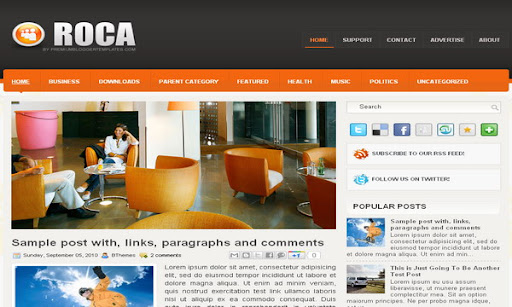
The template details
Features & setup
Template type : 1 Sidebar, 2 Column, Adapted from WordPress, Featured Section, Fixed width, Magazine, Orange, Pbtemplates, Right Sidebar, Slider, Top Navigation Bar, Web 2.0, White
Configure Meta tags
Login to your blogger dashboard--> layout- -> Edit HTML.Now Scroll down to where you see below codes :
<meta content='DESCRIPTION HERE' name='description'/>
<meta content='KEYWORDS HERE' name='keywords'/>
Replace DESCRIPTION HERE,KEYWORDS HERE as below.
DESCRIPTION HERE:Write your blog description
KEYWORDS HERE:Write the keywords of your blog separated by comma.
How To Configure Favicon:
Login to your blogger dashboard--> layout- -> Edit HTML.Now Scroll down to where you see below code :
<link href='YOUR-FAVICON-URL' rel='shortcut icon' type='image/vnd.microsoft.icon'/>
Now replace "YOUR-FAVICON-URL" with your Favicon address/url.
Configure Featured Content Slider:
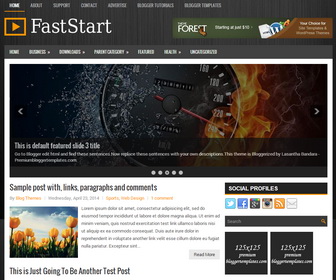
Login to your blogger dashboard--> layout- -> Edit HTML.Find <!-- Featured Content Slider Started -->.Now scroll down slowly and you can see each featured slider codes between <div class='imageElement'> and </div> .
Now replace,
"This is featured post X title" with your featured post title.
"SLIDER-X-URL-HERE" with your featured post URL.
Slider description with your slider description.
Slider image with your slider image.
for each featured slider.
Configure Meta tags
You can add a header logo for this template easily in the "Page Elements" section(Blogger Default Method).Logo image size must be 237px width and 75px height.
If you have any problem regrading this template,leave a comment below.
Important !!!:
Please do not remove the footer credit. I spend several hours to create this blogger template. So that you can use it for your blog. All I ask is, stay the credit intact.
License:
This free Blogger template is licensed under the Creative Commons Attribution 3.0 License,which permits both personal and commercial use.
However, to satisfy the 'attribution' clause of the license, you are required to keep the footer links intact which provides due credit to its authors. For more specific details about the license, you may visit the URL below:
http://creativecommons.org/licenses/by/3.0/
Ready to install?
Back up your current Blogger template first, then follow this template’s own setup notes.
Installation guide → Ask a question →Find your next design
A template that fits your blog.
Choose your style, layout and features to explore the collection.
Keep exploring
Hi there, when I add my feature posts URL in the slider, the stock image has not been replaced (it's still showing your stock template photos). Is this what the URl I am replacing supposed to look like:
http://www.flyingdakini.com/2011/07/charming-baker.html
Thank you!!!!
It's ok I figured it out! Please disregard my last comment. Great template BTW. A million thanks.
hi dear my name is mutahar i want to delete the default feature and change the
header i wonna convert to 4 colomn can you help me email chatatali@gmail.com
Hello Lasanta, This template is beautiful.But their is one problem.I added this template for my blogger blog.But It did't show the maximum number of post in page.If i select 15 it shows only 9. Please please guide me that how to change that post settings.I want to appear at least 15 post appear in main page.
Thank You
Rajath ss
I like this template very much and i intend to use it on my blog.
I want to change something though, but i don't exactly know how to do it. Maybe you can help me please.
On the home page the preview text on each post doesn't care about the paragraph and put every sentence right next to the previous one. How can i change that? I want the text to be displayed like how it is in every post page(with paragraph, title, subtitle and all of that).
Thank you very much.
how can i change the top navigation bar?
https://www.premiumbloggertemplates.com/2010/10/how-to-configure-navigation-menu.html
Please I love this template but I want to erase that hidebar who says BUSSINES, HOME, DOWNLOADS, CHILDCARE and that stuff, I try but really, I cant do it so I'll really apreciate if you can help me!
Diana
If you want a template customization, contact me using out contact form. thank you.