Perslog
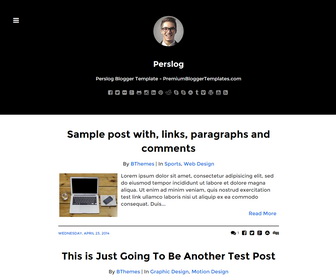
The template details
Features & setup
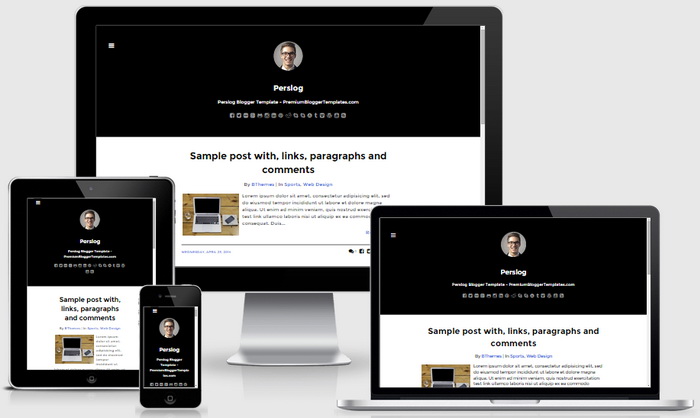
Perslog is a Simple and Elegant, SEO Friendly, Responsive Blogger Template for Writers. Perslog Blogger Template has a Dropdown Menus, Related Posts, Google Fonts, Minimal Design, Display/Hide Sidebar, Social Buttons, Post Share Links and More Features.
Template type : 1 Column, 1 Sidebar, Adapted from WordPress, Black, Elegant, Fixed width, Responsive, Fresh, Left Sidebar, Magazine, Minimalist, Red, Related Posts, SEO Ready, Top Navigation Bar, Web 2.0, White
How to Configure Perslog Blogger Template
Read instructions given below to configure Perslog Blogger Template.
How to Change Header Logo

Find this:
http://2.bp.blogspot.com/-dSwl4CmsxQo/VHPkZBG7piI/AAAAAAAANXw/-QVcKQsugvM/s1600/admin.png
Replace it with your logo image address.
How To Configure Social Buttons

Find this in "Edit HTML":
<ul class='menu-itemspbt' id='menu-social-itemspbt'> <li><a href='http://facebook.com' rel='nofollow' target='_blank'><span>Facebook</span></a></li> <li><a href='http://twitter.com' rel='nofollow' target='_blank'><span>Twitter</span></a></li> <li><a href='http://flickr.com' rel='nofollow' target='_blank'><span>Flickr</span></a></li> <li><a href='http://plus.google.com' rel='nofollow' target='_blank'><span>Google Plus</span></a></li> <li><a href='http://github.com' rel='nofollow' target='_blank'><span>Github</span></a></li> <li><a href='http://instagram.com' rel='nofollow' target='_blank'><span>Instagram</span></a></li> <li><a href='http://linkedin.com' rel='nofollow' target='_blank'><span>Linkedin</span></a></li> <li><a href='http://pinterest.com' rel='nofollow' target='_blank'><span>Pinterest</span></a></li> <li><a href='http://reddit.com' rel='nofollow' target='_blank'><span>Reddit</span></a></li> <li><a href='http://skype.com' rel='nofollow' target='_blank'><span>Skype</span></a></li> <li><a href='http://skype:' rel='nofollow' target='_blank'><span>Skype</span></a></li> <li><a href='http://stumbleupon.com' rel='nofollow' target='_blank'><span>Stumbleupon</span></a></li> <li><a href='http://tumblr.com' rel='nofollow' target='_blank'><span>Tumblr</span></a></li> <li><a href='http://vimeo.com' rel='nofollow' target='_blank'><span>Vimeo</span></a></li> <li><a href='http://wordpress.com' rel='nofollow' target='_blank'><span>WordPress</span></a></li> <li><a href='http://youtube.com' rel='nofollow' target='_blank'><span>Youtube</span></a></li> <li><a expr:href='data:blog.homepageUrl + "feeds/posts/default"' rel='nofollow' target='_blank'><span>RSS</span></a></li> </ul>
Add your social profile URLs replacing these social media networks homepages URLs.
How To Configure Navigation Menu
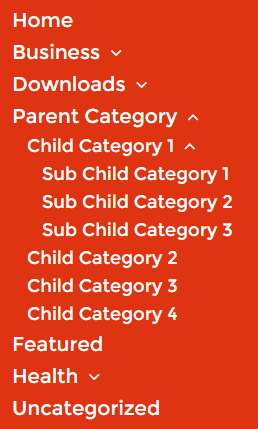
Find this in "Edit HTML":
<div class='menu-topmenu-containerpbt'>
<ul class='nav-menupbt' id='menu-topmenupbt'>

<li><a expr:href='data:blog.homepageUrl'>Home</a></li>

<li class='menu-item-has-children'><a href='#'>Business</a>
<ul class='sub-menu'>
<li><a href='#'>Internet</a></li>
<li><a href='#'>Market</a></li>
<li><a href='#'>Stock</a></li>
</ul>
</li>

...

<li><a href='#'>Uncategorized</a></li>

</ul>
</div>
Replace "#" marks with real URLs and change anchor texts as you like.
Perslog Blogger Template Responsive View:
Important !!!:
Do not remove the footer credits. This Perslog Blogger template is free for both personal and commercial use. However, you are required to keep the footer links intact which provides due credit to its designers and authors.
Ready to install?
Back up your current Blogger template first, then follow this template’s own setup notes.
Installation guide → Ask a question →Find your next design
A template that fits your blog.
Choose your style, layout and features to explore the collection.
Keep exploring
thats was good template..
I have question..
How to insert an image (black screen) behind the photo of admin??
create an image with transparent background.