Adelle
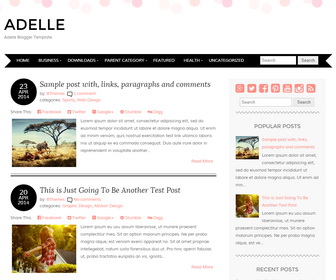
The template details
Features & setup
Adelle Blogger Template comes with a soft pink confetti header and minimalist responsive two-columns, you can get started blogging in no time. It is poised to host any female-oriented brand. Adelle Blogger template has a dropdown menu, related posts, Google fonts, custom post timestamp, post share and social buttons, auto read more and more features.
Template type : 1 Sidebar, 2 Columns, Adapted from WordPress, Elegant, Fixed width, Responsive,jQuery Included, Full Width Header, HTML5, CSS3, Magazine, Minimalist, Mobile Friendly, Pink, Premium, Red, Related Posts with Thumbnails, Right Sidebar, Rounded corners, Search Engine Optimized(PRO), Share Buttons, Social Buttons, Template Designer Compatible(PRO), Top Navigation Menu, Web 2.0, White
Paid Version (Blogger Template Designer Compatible + SEO Friendly)
If you are using the PRO version of "Adelle" Blogger template, you can change the background image, colors and fonts very easily using "Template Designer". Also, it is very search engine friendly (has structured data, meta data,...) and has better support than free version.
How to Configure Adelle Blogger Template
Read instructions given below to configure Adelle Blogger Template.
How To Configure Blogger Timestamp Format

Read this tutorial: http://www.premiumbloggertemplates.com/blog/posted-date-undefined-error-solution/
How To Add Links to Top Navigation Menu
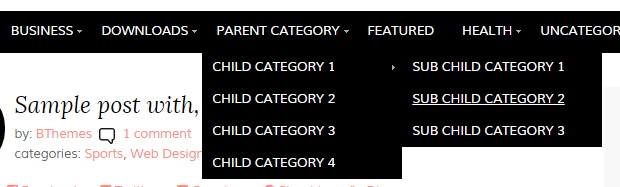
Find this in "Edit HTML":
<ul class='menunbt'>

<li><a expr:href='data:blog.homepageUrl'>Home</a></li>

<li><a href='#'>Business</a>
<ul class='sub-menu'>
<li><a href='#'>Internet</a></li>
<li><a href='#'>Market</a></li>
<li><a href='#'>Stock</a></li>
</ul>
</li>

...

<li><a href='#'>Featured</a></li>

<li><a href='#'>Health</a>
<ul class='sub-menu'>
<li><a href='#'>Childcare</a></li>
<li><a href='#'>Doctors</a></li>
</ul>
</li>

<li><a href='#'>Uncategorized</a></li>

</ul>
Replace "#" marks with real URLs and change anchor texts as you like.
How To Configure Social Buttons
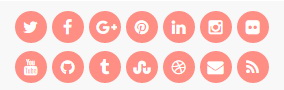
Find this in "Edit HTML":
<div class='adelle-social-icons'>
<ul>
<li><a href='https://twitter.com/' rel='nofollow' target='_blank' title='Twitter'><i class='fa fa-twitter'/></a></li>
<li><a href='https://www.facebook.com/' rel='nofollow' target='_blank' title='Facebook'><i class='fa fa-facebook'/></a></li>
<li><a href='https://plus.google.com/' rel='nofollow' target='_blank' title='GooglePlus'><i class='fa fa-google-plus'/></a></li>
<li><a href='https://www.pinterest.com/' rel='nofollow' target='_blank' title='Pinterest'><i class='fa fa-pinterest'/></a></li>
<li><a href='https://www.linkedin.com/' rel='nofollow' target='_blank' title='Linkedin'><i class='fa fa-linkedin'/></a></li>
<li><a href='https://www.instagram.com/' rel='nofollow' target='_blank' title='Instagram'><i class='fa fa-instagram'/></a></li>
...
</ul>
</div>
Add your own social links replacing default social profile URLs.
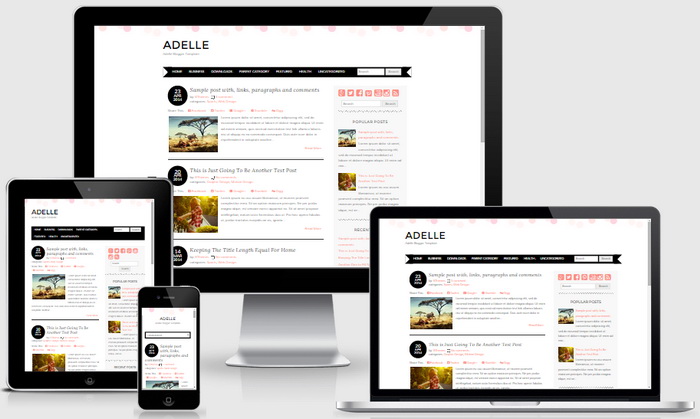
Adelle Blogger Template Responsive View:
Ready to install?
Back up your current Blogger template first, then follow this template’s own setup notes.
Installation guide → Ask a question →Find your next design
A template that fits your blog.
Choose your style, layout and features to explore the collection.
Keep exploring
It is possible to change width in these template? If yes, how can I do it? Thx.
contact me to change widths of "Adelle" Blogger template: https://www.premiumbloggertemplates.com/contact/
Heya, love the template! I'm having problems when you click on 'Subscribe to Posts (Atom)' as it comes up with loads of text. Can you help me rectify this please as I think it's linked to the template. Many thanks.
That is not a template problem. Maybe you are using Chrome browser. try using Firefox.
Thanks so much. love my new blog template...
Hello. May I know how can I change the background image and banner image for page ? I want it to be just white/ transparent.
Thanks in advance
Go to Edit HTML and edit this:
background: #fff url('https://1.bp.blogspot.com/-kL0RSA-z8AM/VBeEiNbz2fI/AAAAAAAAOHk/2YX3H6wSn4Q/s1600/background.gif') repeat-x top center;
Nice blog design!!!
I'd like to know how can I delete the "confeti" in the top of the blog.
Even I'd like to change fonts,I've tried with google fonts and with he @font-face method, but doesn't work.
Hi, Buy the PRO version to change colors and fonts without editing theme code.
the comment box is not showing on my blog, pls what do i do?
http://emeraldfashionblog.blogspot.com
Hi jennifer,
please follow this tutorial if you can not see comments after enabling Google+ profile in Blogger:
http://newbloggerthemes.com/blog/enable-google-plus-comments-in-blogger/
Is there any possibility to make Adelle a 3 column template?
Hi Lana, it's possible. please use contact form for personal customization help. thanks.
Hello, thanks for creating this great template. I really love it and I'm using it for my blog. But I'm having a problem with this template: It shows "undefined" instead of the time. How can I fix it?
https://www.premiumbloggertemplates.com/blog/posted-date-undefined-error-solution/
Hi, is there anyway for my first page to load more than 4 recent posts? i have tried everything!
Kind Regards
Michelle
This is not a theme problem: https://www.premiumbloggertemplates.com/blog/incorrect-number-of-posts-per-page-blogger/
Hi! How can I remove the date (in the black circle) from a post? Thank you!
Add this CSS code just before the ]]></b:skin> tag:
.post-datenbt{display:none;}