Webfolio
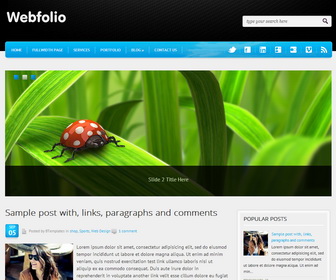
The template details
Features & setup
Template type : 1 Sidebar, 2 Column, 3 Column footer, Adapted from WordPress, Black, Blue, Elegant, Featured Section, Fixed width, Fresh, Grey, Magazine, Premium, Right Sidebar, Rounded corners, Slider, Top Navigation Bar, Web 2.0, White
How To Configure Post Timestamp
Go to "Settings" --> "Language and formatting".
Select "Timestamp Format" from drop-down menu similar to this format : Thursday, September 5, 2013.
Click on "Save settings" button.
How To Configure Social Buttons
Find this in "Edit HTML":
<!-- begin #socialIcons --> <ul id='socialIcons'> <li><a class='twitter tooltip' href='http://www.twitter.com/newbthemes' rel='nofollow' target='_blank' title='Twitter'>Follow us on Twitter</a></li> <li><a class='facebook tooltip' href='http://www.facebook.com/newbthemes' rel='nofollow' target='_blank' title='Facebook'>Join us on Facebook</a></li> <li><a class='linkedin tooltip' href='http://www.linkedin.com/' rel='nofollow' target='_blank' title='LinkedIn'>Join us on LinkedIn</a></li> <li><a class='googleplus tooltip' href='https://plus.google.com/' rel='nofollow' target='_blank' title='Google+'>Join us on Google+</a></li> <li><a class='flickr tooltip' href='http://www.flickr.com/' rel='nofollow' target='_blank' title='Flickr'>Watch us on Flickr</a></li> <li><a class='vimeo tooltip' href='https://vimeo.com/' rel='nofollow' target='_blank' title='Vimeo'>Watch us on Vimeo</a></li> <li><a class='rss tooltip' expr:href='data:blog.homepageUrl + "feeds/posts/default"' rel='nofollow' target='_blank' title='RSS'>RSS Feeds</a></li> </ul> <!-- end #socialIcons -->
Replace existing social links with your own social links.
How To Configure Top Navigation Menu
Find this in "Edit HTML":
<!-- begin nav -->
<nav class='menu-topmenu-container' id='topMenu'>
<ul class='sf-menu' id='menu-topmenu'>
<li><a href='#'>Home</a></li>
<li><a href='#'>FullWidth Page</a></li>
<li><a href='#'>Services</a></li>
<li><a href='#'>Portfolio</a></li>
<li><a href='#'>Blog</a>
<ul class='sub-menu'>
	<li><a href='#'>General</a></li>
	<li><a href='#'>Freebies</a></li>
	<li><a href='#'>Inspiration</a></li>
</ul>
</li>
<li><a href='#'>Contact Us</a></li>
</ul>
</nav>
<!-- end nav -->
You can change "#" marks with your URLs and anchor text with your own words.
More details: http://www.premiumbloggertemplates.com/2010/10/how-to-configure-navigation-menu.html
How To Configure Slider
Find this in "Edit HTML":
<!-- START SLIDER -->
<div id='slider'>
   <a href='ENTER-SLIDE-1-LINK-HERE'>
   <img alt='SlideCaption' src='https://4.bp.blogspot.com/-y4A9Hjr0EPY/Uif3RnXXwII/AAAAAAAALGE/5ksE_uvuOvg/s1600/slide-image-1.jpg' title='Slide 1 Title Here'/>
   </a>
   <a href='ENTER-SLIDE-2-LINK-HERE'>
   <img alt='SlideCaption' src='https://4.bp.blogspot.com/-aNrEisRPbmU/Uif3RZjMzGI/AAAAAAAALGA/mYP0ivTS31c/s1600/slide-image-2.jpg' title='Slide 2 Title Here'/>
   </a>
   <a href='ENTER-SLIDE-3-LINK-HERE'>
   <img alt='SlideCaption' src='https://3.bp.blogspot.com/-qaG66RqISqc/Uif3QYb03BI/AAAAAAAALF4/ohfc1lXbhY4/s1600/slide-image-3.jpg' title='Slide 3 Title Here'/>
   </a>
</div>
<!-- END SLIDER -->
Change "ENTER-SLIDE-X-LINK-HERE"s with real featured posts URLs and replace slide images URLs with your images URLs.
Slide image size should be 960px X 370px.
Ready to install?
Back up your current Blogger template first, then follow this template’s own setup notes.
Installation guide → Ask a question →Find your next design
A template that fits your blog.
Choose your style, layout and features to explore the collection.
Keep exploring