MusicConcert
Free
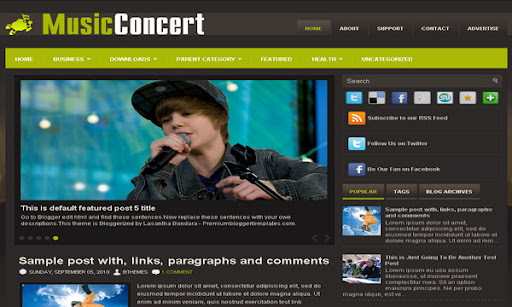
Design preview · Blogger
Enlarge screenshot ↗
(opens preview)
The template details
Features & setup
Template type : 1 Sidebar, 2 Column, 3 Column footer, Adapted from WordPress, Brown, Elegant, Featured Section, Fixed width, Green, Magazine, Premium, Right Sidebar, Slider, Tabbed widget, Top Navigation Bar, Web 2.0, Music
Ready to install?
Back up your current Blogger template first, then follow this template’s own setup notes.
Installation guide → Ask a question →Find your next design
A template that fits your blog.
Choose your style, layout and features to explore the collection.
Keep exploring

Hello Lasantha, Can you Provide WordPress Theme "Comfy" For Blogger?
How would I go about eliminating the green box?
hai lasantha,please tell me how to configure primary menu,cos my static page appear automatic when i change my template blog with your musicconcert blogger template.However i wanna change manually
@jasmin,
if you want to do this customization, then contact me. thanks.
Lasantha
I like the Music Concert Blogger Template but I would like the color scheme to be the colors of my logo (black, gray & teal). I also have a background image i would like to use (it's not online, I paid for a license to use it on my site). How much would you charge for that customization?
contact me for customizations. 🙂
I just tried to post, I am unsure if it worked. I need help changing the photos in the slides.
I sincerely appreciate people like you who work hard to create quality templates for free use-as I'd be lost without it:)
Im not sure how to contact you directly?
-Liz
https://www.premiumbloggertemplates.com/2009/04/contact-us.html
How do you get the navigation bar to navigate to other pages?!
Hi! I had put adsense in the header, but if you will look into my header it's a mess. I cannot make it the logo and the ads only. Pls help...and thanks for a great template....
look like you have edited template widths.
Ok! I have fixed my header widget. Now I need your help about labels, if you look into this link http://sarap2play.blogspot.com/search/label/Shooting...post thumbnails are stretched or get bigger...if you can point me to where to edit this...I would be very thankful.
Also in my featured posts...thumbnails are not centered. I already tried
display: block;
margin-left: auto;
margin-right: auto
but no luck...
Thanks in advance.
Hi, great template! The thumbnails on the post snippets are squishing images that are vertically oriented. Is there a quick fix? thanks
find this and remove:
.post-body img {max-width:99% !important;}
now will work fine.
if you use original download links of premiumbloggertemplates.com , there is not like these problems.
How do you delete the green bar at the top of the page?