Fashionable
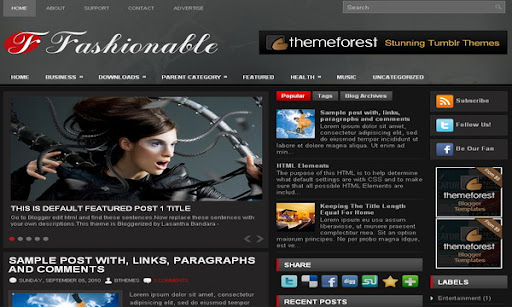
The template details
Features & setup
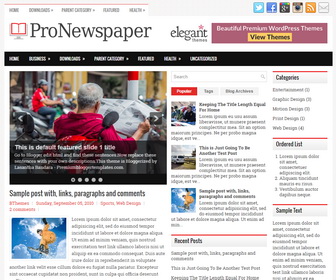
Template type : 2 Sidebar, 3 Column, 3 Column footer, Adapted from WordPress, Black, Elegant, Featured Section, Fixed width, Grey, Header Banner, Magazine, Premium, Red, Right Sidebar, Rounded corners, Slider, Tabbed widget, Top Navigation Bar, Web 2.0
Configure Meta tags
Login to your blogger dashboard--> layout- -> Edit HTML.Now Scroll down to where you see below codes :
<meta content='DESCRIPTION HERE' name='description'/>
<meta content='KEYWORDS HERE' name='keywords'/>
Replace DESCRIPTION HERE,KEYWORDS HERE as below.
DESCRIPTION HERE:Write your blog description
KEYWORDS HERE:Write the keywords of your blog separated by comma.
How To Configure Favicon:
Login to your blogger dashboard--> layout- -> Edit HTML.Now Scroll down to where you see below code :
<link href='YOUR-FAVICON-URL' rel='shortcut icon' type='image/vnd.microsoft.icon'/>
Now replace "YOUR-FAVICON-URL" with your Favicon address/url.
Configure Featured Content Slider:
Login to your blogger dashboard--> layout- -> Edit HTML.Find <!-- Featured Content Slider Started -->.Now scroll down slowly and you can see each featured slide codes between <div class='fp-post'> and </div> .
Now replace,
- "This is default featured post X title" with your featured post title.
- "featured-post-X-url-here" with your featured post URL.
- "Go to Blogger edit html and find these sentences.Now replace these sentences with your own descriptions.This theme is Bloggerized by Lasantha Bandara - Premiumbloggertemplates.com." with your slider description.
- Slider image address with your slider image.
for each featured slide.
How To Configure Second Navigation Menu
Find <div class='menu-secondary-wrap'> inside your template.(using CTRL+F).This is the beginning of the navigation menu.Now follow the steps given here:
How To Configure a Navigation Menu
How To Change Tab Names of Tab Widget
If you want to change your tab names of your tab widget then find this:
<ul class='tabs-widget tabs-widget-widget-themater_tabs-1432447472-id'>
<li><a href='#widget-themater_tabs-1432447472-id1'>Popular</a></li>
<li><a href='#widget-themater_tabs-1432447472-id2'>Tags</a></li>
<li><a href='#widget-themater_tabs-1432447472-id3'>Blog Archives</a></li>
</ul>
Now change the names "Popular", "Tags" and "Blog Archives" as you like.
Configure Meta tags
You can add a header logo for this template easily in the "Page Elements" section(Blogger Default Method).Logo image size must be 404px width and 60px height.
If you have any problem regrading this template,leave a comment below.
Important !!!:
Please do not remove the footer credit. I spend several hours to create this blogger template. So that you can use it for your blog. All I ask is, stay the credit intact.
License:
This free Blogger template is licensed under the Creative Commons Attribution 3.0 License,which permits both personal and commercial use.
However, to satisfy the 'attribution' clause of the license, you are required to keep the footer links intact which provides due credit to its authors. For more specific details about the license, you may visit the URL below:
http://creativecommons.org/licenses/by/3.0/
Ready to install?
Back up your current Blogger template first, then follow this template’s own setup notes.
Installation guide → Ask a question →Find your next design
A template that fits your blog.
Choose your style, layout and features to explore the collection.
Keep exploring
Very nice theme - thanks.
Question: The Safari browser is reporting that open at the side of a fault
occurred and this link (https://businessbox7.server-home.net:8443favicon.ico/) to assist the offender.
How can I fix this?
hi, iam using ur template (after change everything) on my new blog (http://story-info-collections.blogspot.com/). I want to ask about this few line which I am not understand what for it is
Please let me what about it is. Thanks
How do I change the slide show images?
nice themes! : )
How to change font and color for Title blog
Hi, I'm trying to change the slideshow images from my picassa account....there are 2 places in each html code to change it and I've put my link in both but it's not changing...what do I need to do?
thank you very much ! great temp
Wonderful Template... i Love it
Really amazing templates collection..
:):)
Hello,
Need a bit of help. I have tried changing the color, font, size of my blog’s title page to no avail. It still remains what you see above although the actual template shows what I want to chane it to, it still remains the same on the actual font. What am I missing?
Somebody is messing with the links...Take a look at my site now - it's totally messed up.
Did you download your template from BTemplates.com? then download your template again from here (https://www.premiumbloggertemplates.com/). It works fine without any error.
Nice themes : )