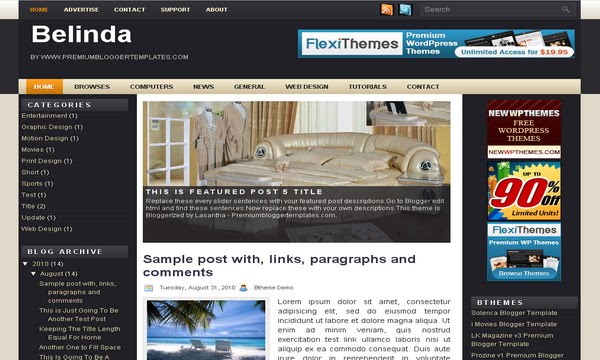
Belinda

The template details
Features & setup
Template type : 2 Sidebar, 3 Column, Adapted from WordPress, Black, Featured Section, Fixed width, Header Banner, Left Sidebar, Magazine, Right Sidebar, Slider, Top Navigation Bar, White, Yellow
Configure Meta tags
Login to your blogger dashboard--> layout- -> Edit HTML.Now Scroll down to where you see below codes :
<meta content='DESCRIPTION HERE' name='description'/>
<meta content='KEYWORDS HERE' name='keywords'/>
Replace DESCRIPTION HERE,KEYWORDS HERE as below.
DESCRIPTION HERE:Write your blog description
KEYWORDS HERE:Write the keywords of your blog separated by comma.
How To Configure Favicon:
Login to your blogger dashboard--> layout- -> Edit HTML.Now Scroll down to where you see below code :
<link href='YOUR-FAVICON-URL' rel='shortcut icon' type='image/vnd.microsoft.icon'/>
Now replace "YOUR-FAVICON-URL" with your Favicon address/url.
Configure Featured Content Slider:
Login to your blogger dashboard--> layout- -> Edit HTML.Find <!-- Featured Content Slider Started -->.Now scroll down slowly and you can see each featured slider codes between <div class='imageElement'> and </div> .
Now replace,
"This is featured post X title" with your featured post title.
"SLIDER-X-URL-HERE" with your featured post title.
Slider description with your slider description.
Slider image with your slider image.
for each featured slider.
If you have any problem regrading this template,leave a comment below.
Important !!!:
Please do not remove the footer credit. I spend several hours to create this blogger template. So that you can use it for your blog. All I ask is, stay the credit intact.
License:
This free Blogger template is licensed under the Creative Commons Attribution 3.0 License,which permits both personal and commercial use.
However, to satisfy the 'attribution' clause of the license, you are required to keep the footer links intact which provides due credit to its authors. For more specific details about the license, you may visit the URL below:
http://creativecommons.org/licenses/by/3.0/
Ready to install?
Back up your current Blogger template first, then follow this template’s own setup notes.
Installation guide → Ask a question →Find your next design
A template that fits your blog.
Choose your style, layout and features to explore the collection.
Keep exploring


Thank you for this template but, I have a problem with slide.
It's all ok except this:
Go to Layout/Page Elements
Apart from the structure of the template, here I see all the images close to the text that I arrange in the slide and it is very inconvinient.
Is it possible to do something not to see the images in Page Elements?
You can see it here(one divides only):
http://i22.servimg.com/u/f22/11/82/05/54/captur10.jpg
Sorry by my english, I speak spanish.
Thank you!
Patri
@Anonymous
Yes I know that.But you can fix it very easily.
Find this:
#myGallery,#myGallerySet,#flickrGallery{width:520px;height:300px;z-index:5;margin-bottom:20px;margin-top:15px}
Now replace it with this:
#myGallery,#myGallerySet,#flickrGallery{width:520px;height:300px;z-index:5;margin-bottom:20px;margin-top:15px;overflow-y:hidden;}
Now save your template.
Perfect!
Thank you very much for the help.
Patri
Hello! I have other question...
How I can add the labels and the number of comments bellow the post title?
I go to Layout/Page Elements/ Blog Posts but nothing
Thank you again
Patri