Crawford
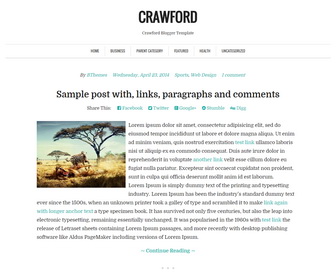
The template details
Features & setup
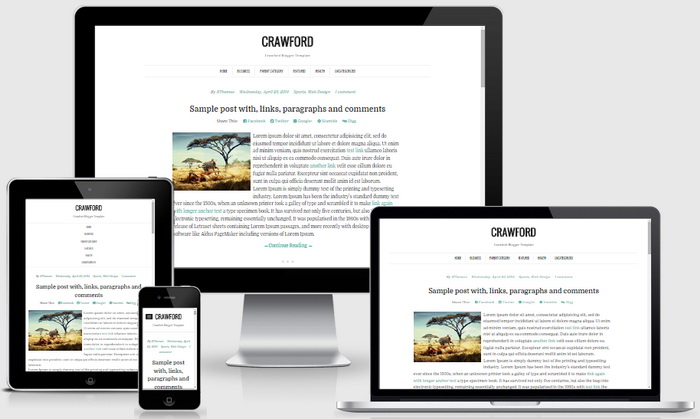
Crawford is a Responsive, Minimal, 1 Column Blogger Template for Personal Blogs or Writers. Crawford Blogger Template has a Dropdown Menus, Related Posts, 3 Columns Footer, Social Links and More Features.
Template type : 1 Column, 3 Column footer, Adapted from WordPress, Fixed width, Responsive, Fresh, Green, Minimalist, Related Posts, Top Navigation Bar, Web 2.0, White
How to Configure Crawford Blogger Template
Read instructions given below to configure Crawford Blogger Template.
How To Add Links to Top Navigation Menu
Find this in "Edit HTML":
<div class='collapse navbar-collapse'>
<ul class='menupbt'>

<li><a expr:href='data:blog.homepageUrl'>Home</a></li>

<li class='menu-item-has-children'><a href='#'>Business</a>
<ul class='sub-menu'>
<li><a href='#'>Internet</a></li>
<li><a href='#'>Market</a></li>
<li><a href='#'>Stock</a></li>
</ul>
</li>

...

<li class='menu-item-has-children'><a href='#'>Health</a>
<ul class='sub-menu'>
<li><a href='#'>Childcare</a></li>
<li><a href='#'>Doctors</a></li>
</ul>
</li>

<li><a href='#'>Uncategorized</a></li>

</ul>
</div>
Replace "#" marks with real URLs and change anchor texts as you like.
How To Configure Bottom Social Links
Find this in "Edit HTML":
<div class='bottomsocialbtnpbt'> <a href='#' rel='nofollow' target='_blank'>Facebook</a> <a href='#' rel='nofollow' target='_blank'>Twitter</a> <a href='#' rel='nofollow' target='_blank'>GooglePlus</a> <a href='#' rel='nofollow' target='_blank'>Instagram</a> <a href='#' rel='nofollow' target='_blank'>Youtube</a> <a href='#' rel='nofollow' target='_blank'>Pinterest</a> <a href='#' rel='nofollow' target='_blank'>Linkedin</a> <a href='#' rel='nofollow' target='_blank'>Dribbble</a> <a href='#' rel='nofollow' target='_blank'>Tumblr</a> <a expr:href='data:blog.homepageUrl + "feeds/posts/default"' rel='nofollow' target='_blank'>Feed</a> </div>
Add your own social links replacing "#" marks.
Crawford Blogger Template Responsive View:
Important !!!:
Do not remove the footer credits. This Crawford Blogger template is free for both personal and commercial use. However, you are required to keep the footer links intact which provides due credit to its designers and authors.
Ready to install?
Back up your current Blogger template first, then follow this template’s own setup notes.
Installation guide → Ask a question →Find your next design
A template that fits your blog.
Choose your style, layout and features to explore the collection.
Keep exploring


Before I say a big thank you. Continue Reading not working, how to fix?
Hi, this theme is supporting for blogger manual read more("After the jump" feature). Once your mouse cursor is placed at the jump point, simply click on the Insert Jump Break toolbar icon.