Forever
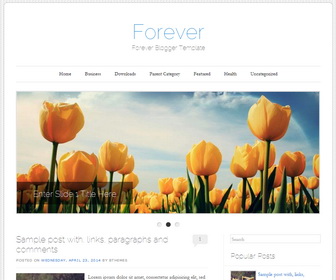
The template details
Features & setup
Forever is a Simple and Beautiful, 2 Columns Blogger Template for your Blog. Forever Blogger Template has a jQuery Slider, Dropdown Menus, Auto Read More, Related Posts, Custom FOnts, 4 Columns Footer and More Features.
Template type : 1 Sidebar, 2 Column, 4 Column footer, Adapted from WordPress, Blue, Elegant, Featured Section, Fixed width, Fresh, Grey, Magazine, Premium, Related Posts, Right Sidebar, Rounded corners, Slider, Top Navigation Bar, Web 2.0, White
How to Configure Forever Blogger Template
Read instructions given below to configure Forever Blogger Template.
How To Add Links to Top Navigation Menu
Find this in "Edit HTML":
<ul class='menupbt'>

<li><a expr:href='data:blog.homepageUrl'>Home</a></li>

<li><a href='#'>Business</a>
<ul class='sub-menu'>
<li><a href='#'>Internet</a></li>
<li><a href='#'>Market</a></li>
<li><a href='#'>Stock</a></li>
</ul>
</li>

...

</ul>
Replace "#" marks with real URLs and change anchor texts as you like.
How To Configure Featured Content Slider:
Find this in "Edit HTML":
<div id='featured-contentpbt'>

    <!-- slide 1 code start -->
    <div class='featured-postblogger' id='featured-post-1'>
        <a href='ENTER-SLIDE-1-LINK-HERE'>
            <img height='355' src='https://2.bp.blogspot.com/-kUJEle2FAg4/U9ZWmVABOBI/AAAAAAAAMS4/C5dnGzUr3AA/s1600/slide-image-1.jpg' width='888'/>
        </a>
        <div class='feature-contentblogger'>
            <h1 class='feature-titleblogger'>
				<a href='ENTER-SLIDE-1-LINK-HERE'>Enter Slide 1 Title Here</a>
			</h1>
        </div>
    </div>
	<!-- slide 1 code end -->

    ...

</div>
There are 3 slides in the slider.
Now replace,
"ENTER-SLIDE-X-LINK-HERE"s with your real slide link,
"Enter Slide X Title Here" with your real slide title,
Slide image URL,
for each slide. (X = 1 or X = 2 or X = 3)
Important !!!:
Do not remove the footer credits. This Forever Blogger template is free for both personal and commercial use. However, you are required to keep the footer links intact which provides due credit to its designers and authors.
Ready to install?
Back up your current Blogger template first, then follow this template’s own setup notes.
Installation guide → Ask a question →Find your next design
A template that fits your blog.
Choose your style, layout and features to explore the collection.
Keep exploring
Thank you so much for sharing this template with us!
I'm planning to use it for my blog, but I want to know how to remove the slider and how to change the image of the background. Hoping for your reply, thank you so much in advance!
to remove slider, remove all codes between:
<!-- featured post slider started -->
<b:if cond='data:blog.pageType != "static_page"'>
<b:if cond='data:blog.pageType != "item"'>
and
</b:if>
</b:if>
<!-- featured post slider end -->
to changes background image, find this:
http://1.bp.blogspot.com/-diOT17QmHrI/U9Yz4QfG5UI/AAAAAAAAMSg/bjm9az_Zv0o/s1600/body-bg.png
replace it with your own background image.
Hi,
I would like to ask:
1] how do you make the width bigger?
2] how do you make the navigations font bigger?
3] how do you move the header image upwards?
4] how do you change the font of the headers?
Thank you so much!
Hi Dawn, you can use contact form to request theme customization.
Hi,
The template is nice but, how can i make the font of the post make bigger?
find this:
body,
button,
input,
select,
textarea {
color: #4a4a4a;
font-family: Garamond, "Hoefler Text",Times New Roman, Times, serif;
font-size: 15px;
font-size: 1.5rem;
font-weight: 300;
line-height: 1.615;
}
Now for example if you need to change font size to 16px, change above code to:
body,
button,
input,
select,
textarea {
color: #4a4a4a;
font-family: Garamond, "Hoefler Text",Times New Roman, Times, serif;
font-size: 16px;
font-size: 1.6rem;
font-weight: 300;
line-height: 1.615;
}