Fizz - Full Responsive
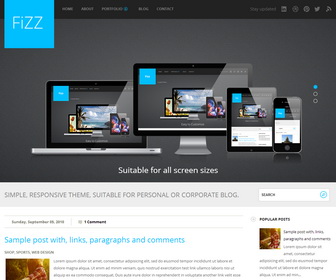
The template details
Features & setup
Template type : Fully Responsive, 1 Sidebar, 2 Column, 4 Column footer, Adapted from WordPress, Black, Blue, Elegant, Featured Section, Fixed width, Responsive, Fresh, Magazine, Premium, Right Sidebar, Slider, Top Navigation Bar, Web 2.0, White
How To Configure Main Menu
Find this in "Edit HTML":
<div class='top-menu-container'>
<nav>
<div id='top-menu'>
<ul class='sf-menu' id='menu-main-menu-1'>
<li><a expr:href='data:blog.homepageUrl'>Home</a></li>
<li><a href='#'>About</a></li>
<li><a href='#'>Portfolio</a>
<ul class='sub-menu'>
	<li><a href='#'>Portfolio Fullwidth</a></li>
	<li><a href='#'>Illustration</a></li>
	<li><a href='#'>Web</a></li>
</ul>
</li>
<li><a href='#'>Blog</a></li>
<li><a href='#'>Contact</a></li>
</ul>
</div>
</nav>
</div>
Replace "#" marks with real URLs and change anchor texts as you like.
http://www.premiumbloggertemplates.com/2010/10/how-to-configure-navigation-menu.html
How To Configure Small Screen Menu
Find this in "Edit HTML":
<div class='block' id='small-screens-menu'>
<a href='#' id='topmenu-button'><strong>:::: MENU ::::</strong></a>
<nav class='menu-main-menu-container'>
<ul class='' id='menu-main-menu'>
<li><a expr:href='data:blog.homepageUrl'>Home</a></li>
<li><a href='#'>About</a></li>
<li><a href='#'>Portfolio</a>
<ul class='sub-menu'>
	<li><a href='#'>Portfolio Fullwidth</a></li>
	<li><a href='#'>Illustration</a></li>
	<li><a href='#'>Web</a></li>
</ul>
</li>
<li><a href='#'>Blog</a></li>
<li><a href='#'>Contact</a></li>
</ul>
</nav>
</div>
Replace "#" marks with real URLs and change anchor texts as you like.
How To Configure Social Buttons
Find this in "Edit HTML":
<ul class='social'> <li>Stay updated</li> <li><a class='linkedin' href='#' title='LinkedIn'>LinkedIn</a></li> <li><a class='dribble' href='#' title='Dribbble'>Dribbble</a></li> <li><a class='pinterest' href='#' title='Pinterest'>Pinterest</a></li> <li><a class='twitter' href='#' title='Twitter'>Twitter</a></li> <li><a class='rss' expr:href='data:blog.homepageUrl + "feeds/posts/default"' title='RSS'/></li> </ul>
Replace existing social links with your own social links.
How To Configure Slider
Find this in "Edit HTML":
<!-- begin #slider -->
<div id='slider_container'>
   <div class='flexslider loading wrapper slide'>
      <ul class='slides'>
         <li>
           <a href='ENTER-SLIDE-1-LINK-HERE'><img src='https://4.bp.blogspot.com/-lYha0GkUr3I/Ui3wOhbUb9I/AAAAAAAAJsg/63kiUXu1JHs/s1600/slide1.png'/></a>
            <div class='flex-caption'>
               <h3>Suitable for all screen sizes</h3>
            </div>
         </li>
         <li>
            <a href='ENTER-SLIDE-2-LINK-HERE'><img src='https://3.bp.blogspot.com/-Rty-Zu3Vw10/Ui3wMzU8FAI/AAAAAAAAJsQ/v-MaYl_3Ouw/s1600/slide2.png'/></a>
            <div class='flex-caption'>
               <h3>Easy to Customize</h3>
            </div>
         </li>
         <li>
            <a href='ENTER-SLIDE-3-LINK-HERE'><img src='https://3.bp.blogspot.com/-06vkVLADgZc/Ui3wNLk_JQI/AAAAAAAAJsU/L6OucnlDaN4/s1600/slide3.png'/></a>
            <div class='flex-caption'>
               <h3>Customizable fonts.</h3>
            </div>
         </li>
      </ul>
   </div>
</div>
<!-- end #slider -->
Change "ENTER-SLIDE-X-LINK-HERE"s with real featured posts URLs and replace slide images URLs with your images URLs.
Slide image size should be 1000px X 375px.
How To Configure "A call-to-action text" Button
Find this in "Edit HTML":
<div class='call_to_action'>
   <div class='radial_gradient'>
      <div class='wrapper'>
         A call-to-action text <a href='#'>Contact us</a>
      </div>
   </div>
</div>
Replace "#" mark with your real contact URL.
Ready to install?
Back up your current Blogger template first, then follow this template’s own setup notes.
Installation guide → Ask a question →Find your next design
A template that fits your blog.
Choose your style, layout and features to explore the collection.
Keep exploring
Lovely Template
Love it..
I already use it for my blog 🙂
Thanks So Much
Thank you for this website template! This is great really. However I just want to ask how to HIDE POSTS on HOME in MOBILE VIEW. Thank you so much again! I hope you can help me.
Hi Neil, for that type of support, please use contact form. Thanks.
This template is very beautiful! Congrats !
How can I change the title of the blog for a picture ?
Instead of Fizz I would like to display the logo.
thanks
try uploading an image for header in Layout page.