
|
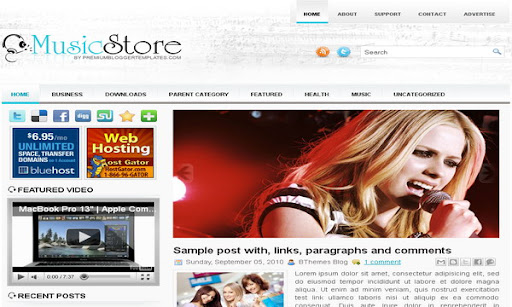
Template name : MusicStore Template type : 1 Sidebar, 2 Column, 3 Column footer, Adapted from WordPress, Blue, Featured Section, Fixed width, Left Sidebar, Magazine, Slider, Top Navigation Bar, Web 2.0, White Release date : April 17, 2011 Coder/Designer Name(s) : Lasantha Bandara / New WP Themes Coder/Designer URL(s) : http://www.premiumbloggertemplates.com/ Basic Instructions : How to install a Blogger template Advanced Details : http://www.premiumbloggertemplates.com/2011/04/musicstore-blogger-template.html |
Bro thanks,this template is awesome!
Cskuan.
Lindo template, muito bom mesmo. 😉
I can't use the slider on another template?
THANK U VERY MUCH MAN....
this is very good , but i have removed the slider...
just take a look
http://factsnfakes.blogspot.com
why images is small as a rectangle?
sorry for my english,lasantha help me
On the homepage, the images on the posts on IE are very tiny (they’re in a corner and just look like a small bar, we can barely see the image), only after selecting the post the image remains ok. ON firefox it works ok, but 90% of my visitors use IE.
http://i51.tinypic.com/drb7et.png here’s the problem on Internet Explorer 9
please can you tell me how to remove the read more feature on all my posts? I love this template but my readers complain abou the read more feature. can it be disabled?
Hi, how can i change the slider, the black part is too big and the photos change too fast for my target, how can i modify it? thanks
On the homepage, the images on the posts on IE are very tiny (they’re in a corner and just look like a small bar, we can barely see the image), only after selecting the post the image remains ok. ON firefox it works ok, but 90% of my visitors use IE.
this problem is because the view compatible with previous versions, but how fix it?
If I want to change the images that are in this bar pictures what should I do?
is to change the photos slide? I tried but could not change the images, only managed to change the title
Love it Thanks