Delicacy
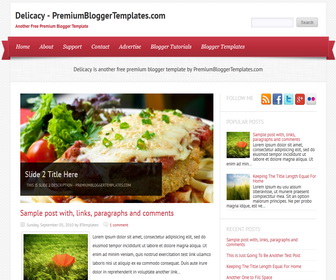
The template details
Features & setup
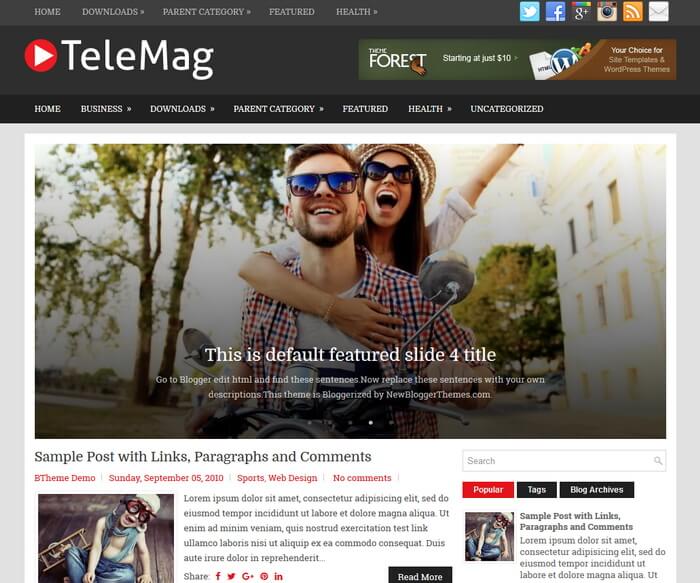
Template type : 1 Sidebar, 2 Column, Adapted from WordPress, Elegant, Featured Section, Fixed width, Fresh, Grey, Header Banner, Magazine, Premium, Red, Right Sidebar, Slider, Top Navigation Bar, Web 2.0, White, Food Blog
Configure Meta tags
Login to your blogger dashboard--> layout- -> Edit HTML.Now Scroll down to where you see below codes :
<meta content='DESCRIPTION HERE' name='description'/>
<meta content='KEYWORDS HERE' name='keywords'/>
Replace DESCRIPTION HERE,KEYWORDS HERE as below.
DESCRIPTION HERE:Write your blog description
KEYWORDS HERE:Write the keywords of your blog separated by comma.
How To Configure Favicon:
Login to your blogger dashboard--> layout- -> Edit HTML.Now Scroll down to where you see below code :
<link href='YOUR-FAVICON-URL' rel='shortcut icon' type='image/vnd.microsoft.icon'/>
Now replace "YOUR-FAVICON-URL" with your Favicon address/url.
Configure Featured Content Slider:
Find this in "Edit HTML":
<div id="slider" class="nivoSlider">
<a href="ENTER-SLIDE-1-LINK-HERE"><img src="http://1.bp.blogspot.com/-aKv8nIc_3qM/UNkZoSgUZGI/AAAAAAAAC9M/43BTdNCigmk/s1600/image-1.jpg" title="#htmlcaption_111" width="600" height="300" /></a>
<a href="ENTER-SLIDE-2-LINK-HERE"><img src="http://4.bp.blogspot.com/-dvrvPk4uW8I/UNkZqIYyh3I/AAAAAAAAC9U/WK77nZ5UJ4g/s1600/image-2.jpg" title="#htmlcaption_112" width="600" height="300" /></a>
<a href="ENTER-SLIDE-3-LINK-HERE"><img src="http://2.bp.blogspot.com/-O6wLp-ywKC8/UNkZr5BRMfI/AAAAAAAAC9c/0-i5IChjK1g/s1600/image-3.jpg" title="#htmlcaption_113" width="600" height="300" /></a>
<a href="ENTER-SLIDE-4-LINK-HERE"><img src="http://1.bp.blogspot.com/-6yAc_UQ3gGM/UNkZtV10o_I/AAAAAAAAC9k/YnOeLRbLo6g/s1600/image-4.jpg" title="#htmlcaption_114" width="600" height="300" /></a>
</div><!-- close #slider -->

<div id="htmlcaption_111"  class="nivo-html-caption">
<h2><a href="ENTER-SLIDE-1-LINK-HERE">Slide 1 Title Here</a></h2>
<p>This is slide 1 description - PremiumBloggerTemplates.com</p>
</div>

<div id="htmlcaption_112"  class="nivo-html-caption">
<h2><a href="ENTER-SLIDE-2-LINK-HERE">Slide 2 Title Here</a></h2>
<p>This is slide 2 description - PremiumBloggerTemplates.com</p>
</div>

<div id="htmlcaption_113"  class="nivo-html-caption">
<h2><a href="ENTER-SLIDE-3-LINK-HERE">Slide 3 Title Here</a></h2>
<p>This is slide 3 description - PremiumBloggerTemplates.com</p>
</div>

<div id="htmlcaption_114"  class="nivo-html-caption">
<h2><a href="ENTER-SLIDE-4-LINK-HERE">Slide 4 Title Here</a></h2>
<p>This is slide 4 description - PremiumBloggerTemplates.com</p>
</div>
Now replace,
"ENTER-SLIDE-X-LINK-HERE"s with real slide URL,
"Slide X Title Here" with real slide title,
"This is slide X description - PremiumBloggerTemplates.com" with real slide description,
slide image url, for each slide.
If you have any problem regrading this template,leave a comment below.
Important !!!:
Please do not remove the footer credit. I spend several hours to create this blogger template. So that you can use it for your blog. All I ask is, stay the credit intact.
License:
This free Blogger template is licensed under the Creative Commons Attribution 3.0 License,which permits both personal and commercial use.
However, to satisfy the 'attribution' clause of the license, you are required to keep the footer links intact which provides due credit to its authors. For more specific details about the license, you may visit the URL below:
http://creativecommons.org/licenses/by/3.0/
Ready to install?
Back up your current Blogger template first, then follow this template’s own setup notes.
Installation guide → Ask a question →Find your next design
A template that fits your blog.
Choose your style, layout and features to explore the collection.
Keep exploring
Thankz for your template and help above
How to increase the column of the width in this template?
you need to edit width properties of "#content" and "#sidebar".
#content {
width: 600px;
}
#sidebar {
width: 299px;
}
Cool & Thanks.It works well
How can I change the width of my blog, I can not find it anywhere? Can you help me, plz
you need to change width values going to "Edit HTML".
Is there a way for the posts to include a date stamp instead of just a time stamp? Thanks!
There are many post timestamp formats under Blogger settings. You can select prefer one.
How can I change the fonts? This is a lovely template, just what I've been looking for!
to change fonts, you need to use "Edit HTML" mode.
What is the image resolution for the slider view? i already crop 500 x 300 pix, but it won't work well. Thanks by the way 🙂
slider image width = 600px
slider image height = 300px
how to make it responsive template
please help
thank you