
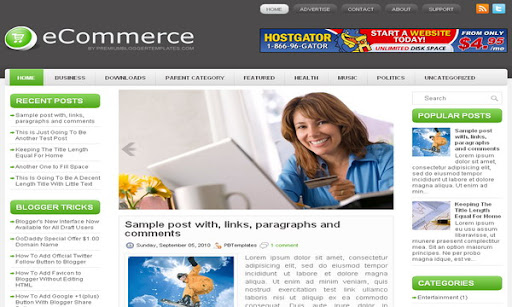
eCommerce Blogger Template

Advertisement

eCommerce Blogger Template

Template name : eCommerce

Template type : 2 Sidebar, 3 Column, Adapted from WordPress, Featured Section, Fixed width, Green, Header Banner, Left Sidebar, Magazine, Right Sidebar, Rounded corners, Slider, Top Navigation Bar, Web 2.0, White

Release date : July 26, 2011

Coder/Designer Name(s) : Lasantha Bandara / New WP Themes

Coder/Designer URL(s) : http://www.premiumbloggertemplates.com/

http://newwpthemes.com/

Basic Instructions : How to install a Blogger template

Advanced Details : http://www.premiumbloggertemplates.com/2011/07/ecommerce-blogger-template.html

Configure Meta tags

Login to your blogger dashboard--> layout- -> Edit HTML.Now Scroll down to where you see below codes :

<meta content='DESCRIPTION HERE' name='description'/>
<meta content='KEYWORDS HERE' name='keywords'/>

Replace DESCRIPTION HERE,KEYWORDS HERE as below.

DESCRIPTION HERE:Write your blog description
KEYWORDS HERE:Write the keywords of your blog separated by comma.

How To Configure Favicon:

Login to your blogger dashboard--> layout- -> Edit HTML.Now Scroll down to where you see below code :

<link href='YOUR-FAVICON-URL' rel='shortcut icon' type='image/vnd.microsoft.icon'/>

Now replace "YOUR-FAVICON-URL" with your Favicon address/url.

Configure Featured Content Slider:

Login to your blogger dashboard--> layout- -> Edit HTML.Find <!-- Featured Content Slider Started -->.Now scroll down slowly and you can see each featured slider codes between <div class='imageElement'> and </div> .

Now replace,

"This is featured post X title" with your featured post title.
"SLIDER-X-URL-HERE" with your featured post URL.
Slider description with your slider description.
Slider image with your slider image.

for each featured slider.

How To Add a Header Logo

You can add a header logo for this template easily in the "Page Elements" section(Blogger Default Method).Logo image size must be 359px width and 61px height.

If you have any problem regrading this template,leave a comment below.

Important !!!:

Please do not remove the footer credit. I spend several hours to create this blogger template. So that you can use it for your blog. All I ask is, stay the credit intact.

License:

This free Blogger template is licensed under the Creative Commons Attribution 3.0 License,which permits both personal and commercial use.
However, to satisfy the 'attribution' clause of the license, you are required to keep the footer links intact which provides due credit to its authors. For more specific details about the license, you may visit the URL below:

http://creativecommons.org/licenses/by/3.0/

12 Responses to “eCommerce Blogger Template”

  1. I learned a lot from this post, much appreciated! :)

  2. Replica Pens says:

    Thanks for the great article….

  3. rahul says:

    HOW TO EDIT THE HEADER BACKGROUND WHICH IS DARK BROWN.
    see my website http://www.examportal.in logo is not look perfect. if anybody else have answer mail me to :

    eportal.in@gmail.com

    • pbtemplates says:

      find this and change value as you like:

      background:#F2F2F2 url(http://1.bp.blogspot.com/-GpmQljAeIzg/TjG3C6t1U9I/AAAAAAAAAPY/AZoLJAf6MEU/s000/background.png) left top repeat-x;

  4. tabi says:

    awesome them Lasantha

  5. tabi says:

    how to add my labels in the vatogry at the theme after header sectin? please send me your answer at pixxax.gmail.com

  6. Jay says:

    Ey Mister Lasantha, this blog is amazing!!!

  7. Mario says:

    Please Tell me how to change buttons HOME , BUSINESS , and linked in ?

    • pbtemplates says:

      when you add a page to your blog, it will be automatically added to the navigation menu. navigation menu texts such as "About","Support" equal to the titles of the pages. If you want to add external links to the navigation menu, it must be change as a Linklist widget. Contact me for this customization. Thank you.

  8. Wonderful and wobbly! I was so thankful i found you!!

  9. Yonasme says:

    How can i add a bigger image size in the header ??? I tryed to modify the header padding but didnt work, can some1 help me?

Have a Problem with a template? First Read Our Blog for fast solutions.

Leave a Reply