Korporate
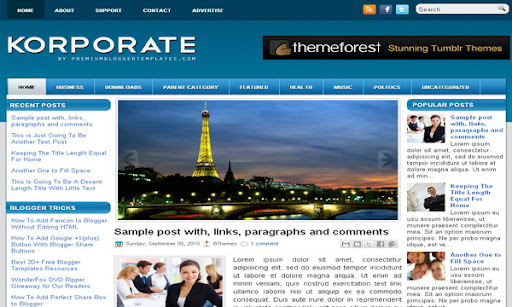
The template details
Features & setup
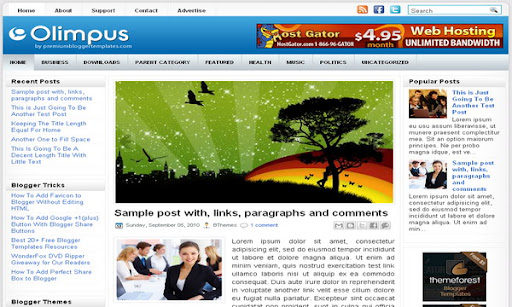
Template type : 2 Sidebar, 3 Column, Adapted from WordPress, Blue, Featured Section, Fixed width, Header Banner, Left Sidebar, Magazine, Right Sidebar, Slider, Top Navigation Bar, Web 2.0, White
Configure Meta tags
Login to your blogger dashboard--> layout- -> Edit HTML.Now Scroll down to where you see below codes :
<meta content='DESCRIPTION HERE' name='description'/>
<meta content='KEYWORDS HERE' name='keywords'/>
Replace DESCRIPTION HERE,KEYWORDS HERE as below.
DESCRIPTION HERE:Write your blog description
KEYWORDS HERE:Write the keywords of your blog separated by comma.
How To Configure Favicon:
Login to your blogger dashboard--> layout- -> Edit HTML.Now Scroll down to where you see below code :
<link href='YOUR-FAVICON-URL' rel='shortcut icon' type='image/vnd.microsoft.icon'/>
Now replace "YOUR-FAVICON-URL" with your Favicon address/url.
Configure Featured Content Slider:
Login to your blogger dashboard--> layout- -> Edit HTML.Find <!-- Featured Content Slider Started -->.Now scroll down slowly and you can see each featured slider codes between <div class='imageElement'> and </div> .
Now replace,
"This is featured post X title" with your featured post title.
"SLIDER-X-URL-HERE" with your featured post URL.
Slider description with your slider description.
Slider image with your slider image.
for each featured slider.
Configure Meta tags
You can add a header logo for this template easily in the "Page Elements" section(Blogger Default Method).Logo image size must be 384px width and 85px height.
If you have any problem regrading this template,leave a comment below.
Important !!!:
Please do not remove the footer credit. I spend several hours to create this blogger template. So that you can use it for your blog. All I ask is, stay the credit intact.
License:
This free Blogger template is licensed under the Creative Commons Attribution 3.0 License,which permits both personal and commercial use.
However, to satisfy the 'attribution' clause of the license, you are required to keep the footer links intact which provides due credit to its authors. For more specific details about the license, you may visit the URL below:
http://creativecommons.org/licenses/by/3.0/
Ready to install?
Back up your current Blogger template first, then follow this template’s own setup notes.
Installation guide → Ask a question →Find your next design
A template that fits your blog.
Choose your style, layout and features to explore the collection.
Keep exploring
Thanks for the wonderful template.
http://www.gamezox.net/
This is probably the best theme for blogger. I have just one question: how can I post a new article without writing it in HTML?
very nice and professional looking template thank you very much for you great work and keep it up
Very beautiful template, i'll make it for my blog's template
I, too, like this template. I have questions about the template. Like, how would someone add the facebook "like" button to each post or what would you recommend.
Second question... When I changed the links (Health/Business) on the navigation bar and added a Contact page the Nav bar started acting a little weird with the color.
Also, is it possible to add "gadgets" to the pages that are added?
the page navigation does not work to my blog...how to fix it?
Nice template
www.indiacurrentgk.com
B-e-a-u-t-i-f-u-l!!! I love it! So easy to configure! Thank you Lasantha
thanks for the template very nice. but how to change to featured picture?
thanks for the template . . .