
If you download a blogger template from http://www.premiumbloggertemplates.com/ and not displaying Blogger share buttons or only showing blank space, then follow the steps given below to fix that problem.
Go to "Edit HTML" and check "Expand Widget Templates".
Find this and remove it(If you can not found it,skip this step):
<b:include data='post' name='shareButtons'/>
Now find a similar code(not exactly similar) to this:
<b:includable id='shareButtons' var='post'>
<b:if cond='data:post.sharePostUrl'>
<a class='share-button sb-email' expr:href='data:post.sharePostUrl + "&target=email"' expr:title='data:top.emailThisMsg' target='_blank'>
<span class='share-button-link-text'><data:top.emailThisMsg/></span></a>
<a class='share-button sb-blog' expr:href='data:post.sharePostUrl + "&target=blog"' expr:onclick='"window.open(this.href, "_blank", "height=270,width=475"); return false;"' expr:title='data:top.blogThisMsg' target='_blank'>
<span class='share-button-link-text'><data:top.blogThisMsg/></span></a>
<a class='share-button sb-twitter' expr:href='data:post.sharePostUrl + "&target=twitter"' expr:title='data:top.shareToTwitterMsg' target='_blank'>
<span class='share-button-link-text'><data:top.shareToTwitterMsg/></span></a>
<a class='share-button sb-facebook' expr:href='data:post.sharePostUrl + "&target=facebook"' expr:onclick='"window.open(this.href, "_blank", "height=430,width=640"); return false;"' expr:title='data:top.shareToFacebookMsg' target='_blank'>
<span class='share-button-link-text'><data:top.shareToFacebookMsg/></span></a>
<a class='share-button sb-buzz' expr:href='data:post.sharePostUrl + "&target=buzz"' expr:onclick='"window.open(this.href, "_blank", "height=415,width=690"); return false;"' expr:title='data:top.shareToBuzzMsg' target='_blank'>
<span class='share-button-link-text'><data:top.shareToBuzzMsg/></span></a>
</b:if>
</b:includable>
Look at the picture:
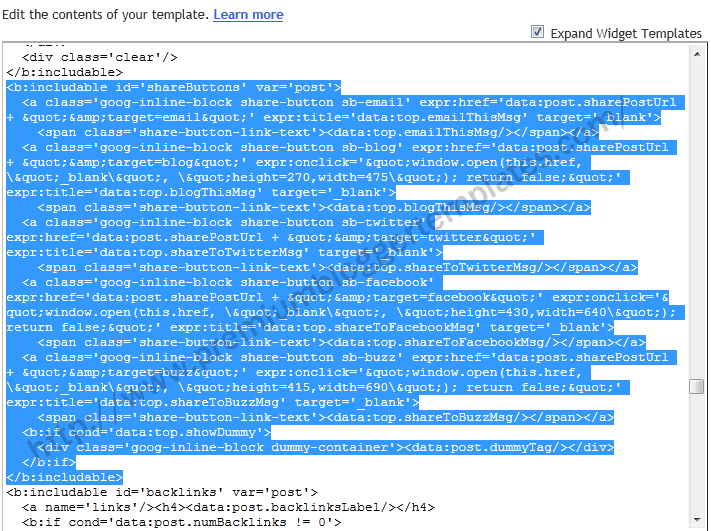
Delete the above code.
Now add below code just above the </head> tag.
<script type="text/javascript" src="http://apis.google.com/js/plusone.js">
{lang: 'en-US'}
</script>
If you want to show share buttons below blogger post,then paste your code just after <data:post.body/>.
Blogger share buttons Code :
<div class='post-share-buttons'>
<b:include data='post' name='shareButtons'/>
</div>
Save your template.
Thanks Bro...
Thanks for providing very eye catching templates.
I have tried following the above on my template (based on Ecomode) and there are 4 places where exists in the template. What is the correct way to edit?
Many thanks!
I searched tons of "solutions" on this issue, and with all no avail. I find your post and fixed it on the first try. Thanks so much for such precise instructions 🙂
THANK YOU ! It was very helpful!! It was easy and very fast and it shows perfectly on my blog!
It works. Thanks
This is just what I needed. Thanks!
Thank you ^^
God, thank you so much for this solution, I have been head bashing over this all day and couldn't find a single website to help me with the code. Luckily, I found this in the end <3 Thanks again!
THANKS!!! You're a genius. I tried some other tutorial before this, but it didn't work. Yours did the job. Thanks!
Thankss a Millionnnnnnnnnnnn!!!!! 4 hour im trying other method from various blogger tutorial , finally found yours,, awesome, gd job myfriend
Thank you for the Amazing Templates !!!!
Great work. Thank you very much.
thank you for the solution!
Thanks for this code. thos really helped as i'm new with blogger.
thanks ,,your given solution work for me.
thank you